Whether you have a question about your billing, need technical assistance, or want to request a new feature, our support team is always ready to help. You can submit a request directly from your dashboard without ever needing to open your email client.
Submitting a Support Ticket
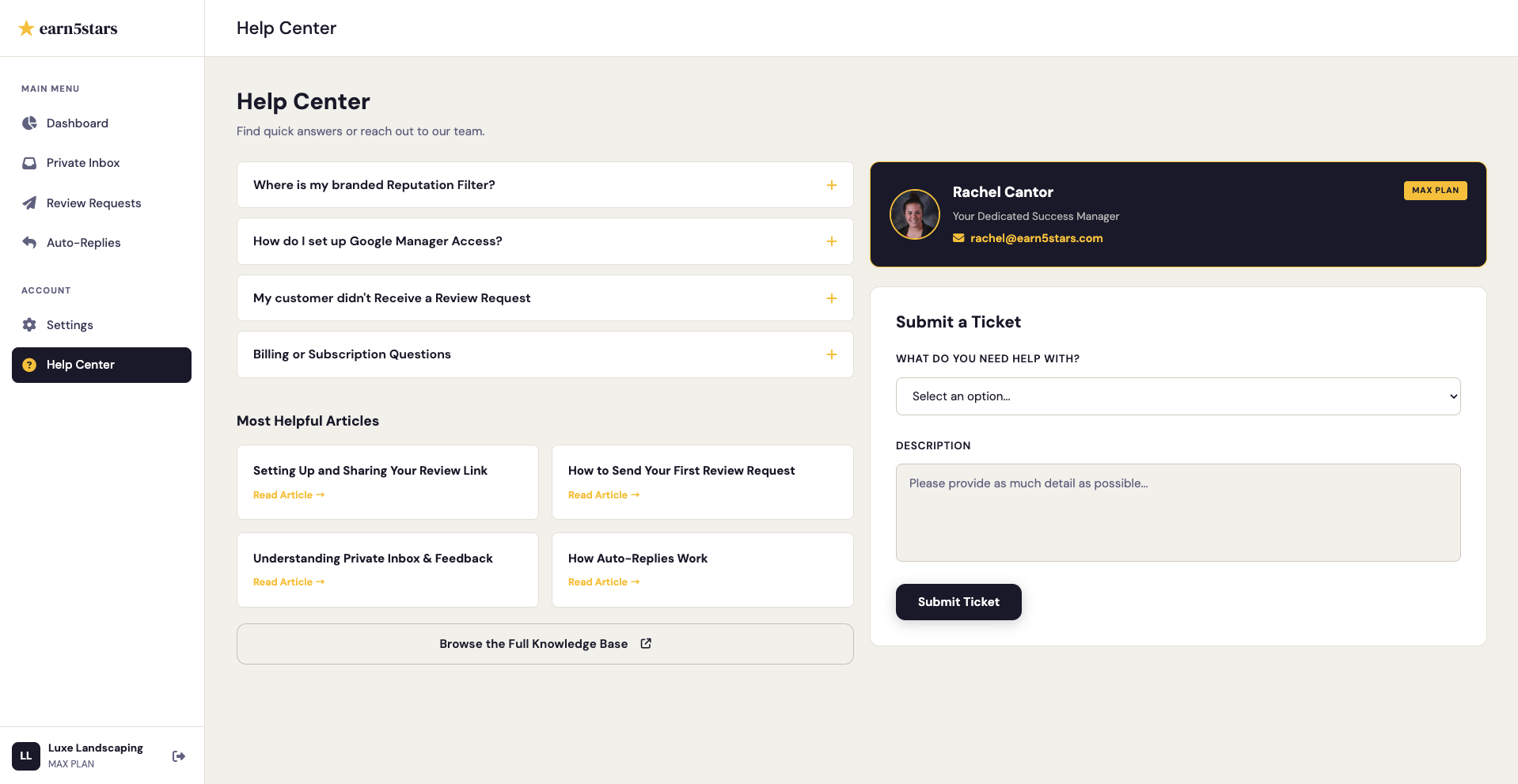
To ensure your request is routed to the correct department and handled as quickly as possible, please use the built-in ticketing system.
- Log in to your earn5stars Dashboard.
- Navigate to the Help Center tab located in your left-hand sidebar.
- Scroll down to the Submit a Ticket section.
- Select a Subject from the dropdown menu (e.g., Technical Issue, Billing Question, Feature Request).
- Fill out the Description box with as much detail as possible about your issue.
- Click the Submit Ticket button.
Once submitted, a member of our support team will review your ticket and reach out to you via the email address associated with your account.
For Max Tier Subscribers
If you are on the Max plan, you have a Dedicated Success Manager assigned to your account.
Contacting Your Success Manager
When you navigate to the Help Center tab, you will see your Success Manager's profile card on the right side of the screen. You can click their email address to contact them directly. Alternatively, if you submit a standard support ticket, it will automatically bypass the general queue and be sent directly to your dedicated manager for priority handling.